

-
Lenovo Legion Pro 7i Gen 9
Lenovo’s Legion Pro 7i gaming laptop sports an Intel Core i9 CPU, up to an Nvidia RTX 4090 GPU, and up to 32GB of memory on top of a 240Hz G-SYNC display. Altogether, this is a seriously impressive machine well worth considering.
Pros- Top-tier CPU and GPU
- 240Hz refresh rate
- Comfy keyboard
Cons- Limited options for storage and RAM
- Bulky and expensive
-
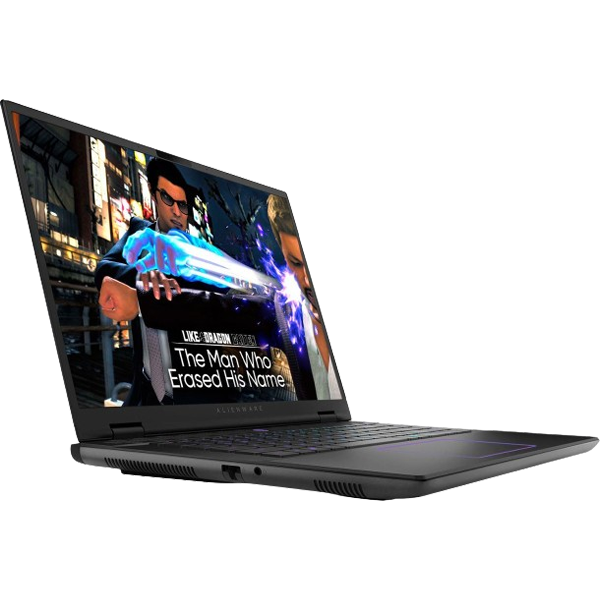
Alienware m16 R2
The new m16 R2 from Alienware features Intel Core Ultra chips, up to an Nvidia RTX 4070, and up to 64GB of RAM. With a 240Hz display and as much storage as you could want, this is an all-around intensively premium gaming laptop worth a look.
Pros- Lots of memory and storage
- Impressive hardware
- Responsive display
Cons- Pricey and heavy
- Limited to RTX 4070

In the world of laptops, the best gaming machines out there are some of the most powerful. Among them, Lenovo laptops and Alienware computers are some of the most popular choices. So, how does Lenovo’s latest Legion Pro 7i stack up against Alienware’s new m16 R2?
You’re in luck, because we’ve got the ultimate comparison between the Legion Pro 7i Gen 9 and the Alienware m16 R2.
Price, availability, and specs
Premium machines for premium prices
Lenovo’s Legion Pro 7i is available at a variety of retailers, and pricing is currently at $2900. Keep in mind, Lenovo runs frequent sales (so this may fluctuate) and only one model of the Pro 7i is currently available for sale. Other models, like those without a 4090, would naturally be cheaper.
Alienware’s m16 R2 is similarly available at your retailer of choice, and pricing begins at $1500, scaling up depending on how you configure it. At the top end, expect to spend nearly $4000 on a fully-kitted m16 R2, though you still won’t be getting a 4090.
-
Lenovo Legion Pro 7i Gen 9 Alienware m16 R2 CPU Intel Core i9-14900HX, 24 cores, 32 threads Up to Intel Core Ultra 9 GPU Up to Nvidia GeForce RTX 4090 Laptop Up to Nvidia GeForce RTX 4070 Laptop GPU Display (Size, Resolution) 16-inch QHD+ 16-inch QHD+ (2560 x 1600) 240Hz, 3ms, 100% sRGB, NVIDIA G-SYNC RAM Up to 32GB DDR5 5600 MT/s Up to 64GB DDR5 5600 MT/s Storage Up to 2TB M.2 NVMe SSD Up to 8TB Battery 99.99Whr 90Wh Ports 1x headphone/microphone combo, 4x USB-A, 1x Thunderbolt 4, 1x Ethernet RJ-45, 1x USB-C with PD and DP 1.4, 1x HDMI 1x Thunderbolt 4, 2x USB-A 3.2 Gen 1, 1x USB-C 3.2 Gen 2, 1x HDMI 2.1, 3.5mm headphone jack, 1x microSD card reader, 1x RJ45 Ethernet Operating System Windows 11 Home Windows 11 Home Dimensions 363.5 x 262.1 x 25.9 mm (14.31 x 10.32 x 1.02 inches) 363.90×249.40×23.50mm (14.33×9.81×0.93 inches) Weight 2.62 kg (5.78 lbs) 2.61 kg (5.75 lb) Speakers 2x 2W Harman stereo speakers Six speaker setup (2x 2W tweeters, 4x 3W woofers) Colors Eclipse Black Dark Metallic Moon Price Starting at $2,900 Starting at $1,500
Design and display
Traditional laptops, nontraditional power

In terms of core design, both the Legion and Alienware are pretty standard clamshell laptops. Both certainly look and feel premium, but they are also fairly thick and chunky, and they’ve got a fair amount of RGB, which is to be expected from most gaming laptops. They aren’t as sleek and minimalist as a MacBook Pro, which is understandable since they’ve got a lot more that they need to fit inside.
For weight and size, once again, things are pretty similar. Make sure to keep in mind that these are exceptionally heavy machines, as both come in at nearly six pounds, so if you’re looking for an ultraportable laptop, definitely think about picking a different computer.
When it comes to the display, both are packing 16-inch QHD+ 240Hz panels as well as G-SYNC technology. These are definitely great for high-refresh-rate gaming, but you will miss out on OLED or Mini-LED and the 4K support those display types both offer. This isn’t to say that the image quality is terrible on these machines, far from it, but you won’t be getting the premium visuals you can get with more advanced panel tech and higher resolutions.
Webcams here are nothing to write home about: both feature 1080p cameras that should suffice for Zoom meetings and video calls. Ultimately, the design and display of these computers are quite evenly matched, so there isn’t a clear winner in these categories.
Winner: Tie
Hardware and performance
Not the strongest showing for the m16 R2

While these are both premium gaming laptops, there are some key hardware differences. For one, the Legion features a Core i9-14900HX, while the Alienware supports up to an Intel Core Ultra 9 185H. For GPU, the Legion has up to an RTX 4090, while the Alienware caps out at an RTX 4070.
Both the 4070 and the 185H are powerful pieces of kit, especially the 185H’s integrated graphics performance. However, the 14900HX simply has more cores, more threads, and faster clocks, while the 4090 is the meatier GPU. All this adds up to better performance on the Legion, which will be especially relevant if you’re trying to reach the 240Hz refresh rate of the display on either machine.
That being said, you can have up to 64GB of RAM on the Alienware whereas the Legion stops at 32GB. The Legion can support up to 2TB of storage, whereas the Alienware can go up to an impressive 8TB. Raw performance may be better on the Legion, but there are certainly some perks with opting for the Alienware if you need a ton of memory or storage space.
While Alienware’s m16 R2 is certainly an impressively powerful machine in its own right, and though it can pack in more memory and storage than the Legion, its CPU and GPU are outpaced by the more powerful, more premium kit inside the Legion Pro 7i. Unless you really, really need 64GB of RAM or endless storage, the clear winner here is the Legion.
Winner: Legion Pro 7i
Battery life
Not a strong point for gaming laptops in general

Source: Lenovo
We haven’t reviewed the Legion just yet, but we have reviewed the Alienware m16 R2.
The Alienware didn’t fare so well in terms of battery life, though. In general, we weren’t able to get more than a few hours out of it before needing to plug in, especially when doing anything intensive. The Legion, on the other hand, has a slightly larger battery, so it may fare slightly better, but battery life is not a strong suit of any gaming laptop. Like the Alienware, it’s unlikely the Legion will be able to last long when pushing its hardware to the limit.
Put simply, we’d recommend bringing a charger and setting up near an outlet regardless.
Winner: Tie
Overall winner: Lenovo Legion Pro 7i
Top-notch hardware for a top-notch experience
Thanks to support for up to an Nvidia RTX 4090 as well as a powerful 14900HX chip, the Legion Pro 7i pulls ahead of the Alienware m16 R2. However, this is the cutting-edge of laptop technology, and you may not need all of these features.
Even if you have the budget for a pricier machine, if you’re primarily planning to use your laptop for work with some gaming in the evening, or for extensive media storage, you might prefer the Alienware’s higher memory and capacity. Nonetheless, as a gaming machine, its better gaming performance makes the Legion our top pick.

Lenovo Legion Pro 7i Gen 9
Editor’s choice
Lenovo’s Legion Pro 7i gaming laptop sports an Intel Core i9 CPU, up to an Nvidia RTX 4090 GPU, and up to 32GB of memory on top of a 240Hz G-SYNC display. Altogether, this is a seriously impressive machine well worth considering.

Alienware m16 R2
Runner-up
The new m16 R2 from Alienware features Intel Core Ultra chips, up to an Nvidia RTX 4070, and up to 64GB of RAM. With a 240Hz display and as much storage as you could want, this is an all-around intensively premium gaming laptop worth a look.
#Lenovo #Legion #Pro #Alienware #m16 #buy
source: https://www.xda-developers.com/lenovo-legion-pro-7i-vs-alienware-m16-r2/


