

Not all of the new iOS 18 features are available right now, especially Apple Intelligence, if you install the iOS 18 developer beta. The “Send Later” feature in the Messages app that allows you to schedule when a text will be released is available now as is the feature allowing you to see the time on your iPhone even when the battery is dead. Still, no matter which new iOS 18 capabilities have been added to the developer beta, it really is not a good time to be installing it.
Apple used to charge those who wanted to be known as an Apple Developer which would allow them to get the very first crack at updating a new iOS build. Starting with iOS 17 last year, Apple stopped charging $99 which means that anyone can be a developer and install the developer beta. But is it a good idea? Considering that beta versions of software are usually unstable and very buggy, features that you count on every day might stop working and your battery life could take a huge hit.
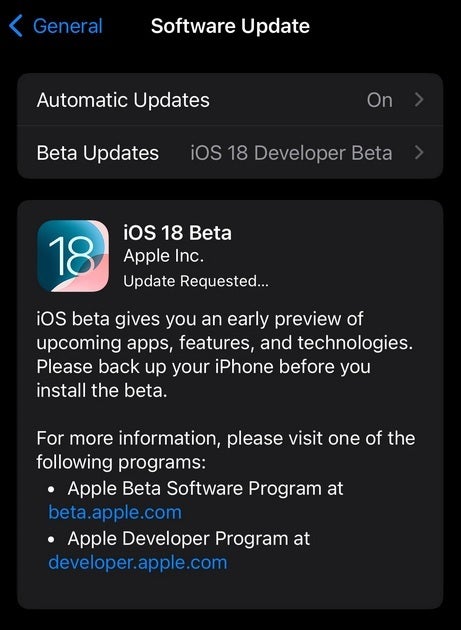
Many iPhone users are tempted to install the iOS 18 developer beta
Some of the problems that iPhone users running the developer preview of iOS 18 have experienced include notifications not arriving, apps not opening at all (when they do, some of them crash), iMessages being sent as SMS (which means no encryption, no read receipt, no typing indicators, and low-quality images) and general performance problems. Don’t let others who have installed the beta talk you into taking the risk.
One Redditor with the user name jangirkapin wrote, “I regret so much, I wish I could easily go back to my lovely 16.6 some other apps don’t work at all and why … just some random dude showed me that he has the newest iOS and I really went for it why.” On the other hand, some iPhone users were happy to take the risk of installing the beta just to be able to take the flashlight and camera icons off of their lock screens.
If you decide to install the iOS 18 developer beta anyway, here is how you do it. First, back up your data in case you want to exit the beta program and don’t feel like wiping your iPhone. Go to www.beta.apple.com or click on this link. Tap on the Sign In box and use your Apple ID info to join the beta program. Next, turn to your iPhone and go to Settings > General > Software Update. On the top of the screen top the Beta Updates bar and then tap on iOS 18 Developer Beta. Exit the page. After a little while, go back to Settings > General > Software Update and you should have the opportunity to install the iOS 18 developer preview.
If you aren’t a masochist, you might want to wait until next month for the release of the iOS 18 public beta. And if you don’t want to take any chances, the stable version of iOS 18 will be out in September to coincide with the release of the iPhone 16 line. If you do install the iOS 18 developer beta and your phone is bricked, or important features you need are not working, don’t say that we didn’t warn you.
By the way, the iPhone models that support iOS 18 are:
#Here039s #shouldn039t #install #iOS #developer #beta
source: https://www.phonearena.com/news/why-you-shouldnt-install-ios-18-developer-beta_id159401
/cdn.vox-cdn.com/uploads/chorus_asset/file/25490522/Yahoo_News_App_.jpg?w=1068&resize=1068,0&ssl=1 "Yahoo resurrects Artifact inside a new AI-powered News app")

