

-
Surface Pro 11
Microsoft’s Surface Pro 11 is a premium convertible featuring Snapdragon X Elite chips, an OLED display option, up to 32GB of RAM, and an impressive webcam setup. Most importantly, this fabulous laptop starts off at just $1000, making it an affordable all-around option for most folks.
Pros- Convertible design
- Snapdragon chips
- Affordable pricepoint
-
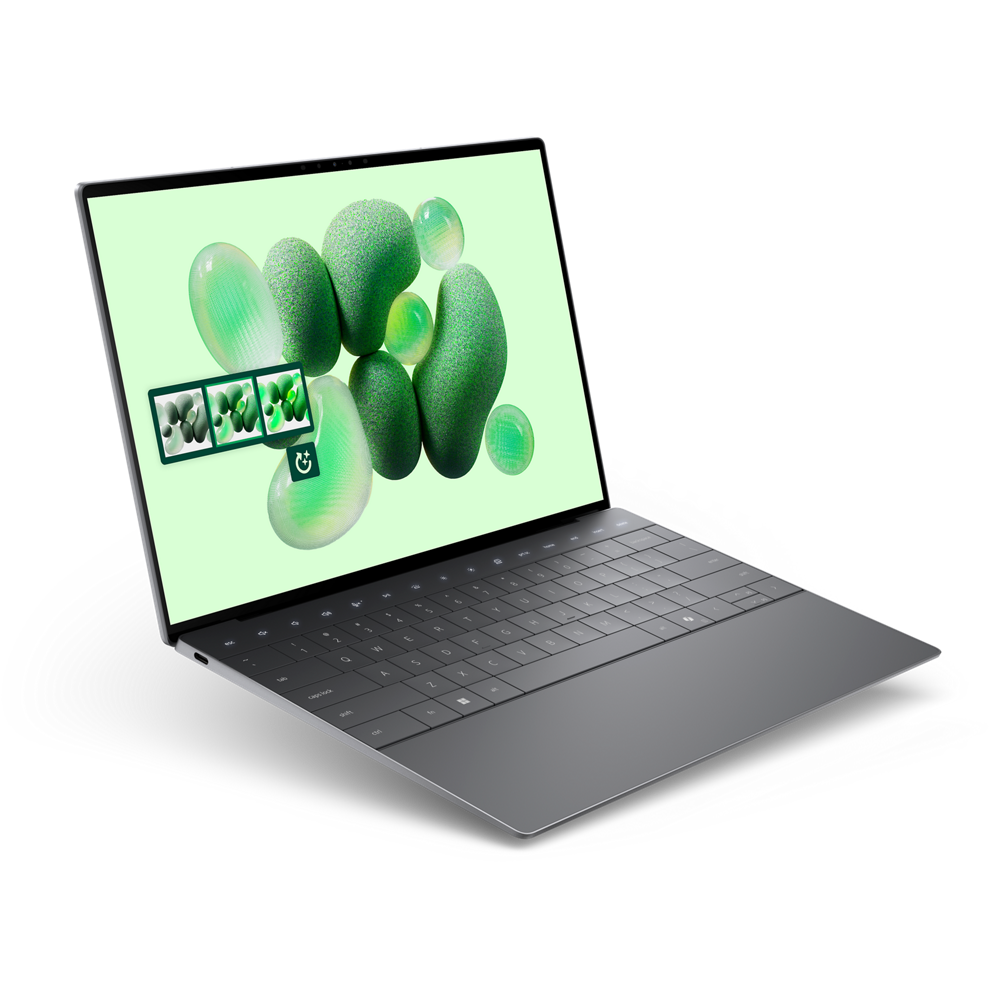
Dell XPS 13
Dell’s XPS 13 laptop has been updated to sport Snapdragon X Elite chips on top of its Intel Core Ultra offerings. You’re also getting an OLED display option alongside a stylish, lightweight design. If you’re looking for a premium machine, this is definitely worth consideration.
Pros- Core Ultra and Snapdragon options
- Lots of storage and RAM available
- Stylish design

When looking for a great laptop, convertibles are always worth checking out, like Microsoft’s Surface line. Dell’s XPS line is another excellent contender. Between the new Surface Pro 11 and XPS 13, though, which is the better overall machine? Luckily, we’re here to help.
Below, you’ll find the ultimate Dell XPS 13 vs. Microsoft Surface Pro 11 comparison.
Price, availability, and specs
Similar prices for similar machines
You can order a Surface Pro 11 now, and pricing kicks off at just $1000. However, keep in mind that the price can quickly increase to above $2000 once you include higher tier options. Also, at the time of writing, models with 5G support aren’t available. We can expect those to arrive later in 2024, according to Microsoft.
Dell’s XPS 13 is also available now, and pricing starts at $1299. Depending on configuration, expect to pay well above $2000 with the higher tier options. However, currently there are limited options for Snapdragon-based XPS 13s, so you may have to wait for more models to get added, if you are interested.
-
Surface Pro 11 Dell XPS 13 (2024, Qualcomm) CPU Qualcomm Snapdragon X Plus or Qualcomm Snapdragon X Elite Qualcomm Snapdragon X Elite (X1E-80-100) GPU Qualcomm Adreno Qualcomm Adreno Display type IPS or OLED PixelSense Flow IPS or OLED, up to 500 nits, up to 100% DCI-P3, optional touch, up to DisplayHDR TrueBlack 500, up to 120Hz Display (Size, Resolution) 13-inch, 2880×1920 13.4-inch, up to 2880×1800 RAM 16GB or 32GB LPDDR5x Up to 64GB LPDDR5x (8400MT/s) Storage 256GB, 512GB, or 1TB SSD Up to 4TB PCIe 4.0 SSD Battery Up to 14 hours of video playback (Wi-Fi model) 55Whr Ports 2x USB4 and 1x Surface Connect 2x USB4 Operating System Windows 11 Windows 11 Webcam 5MP + IR 1440p front-facing camera, 10MP rear-facing camera 1080p + IR Cellular connectivity Yes, optional 5G No Wi-Fi connectivity Wi-Fi 7 W-Fi 7 Bluetooth Bluetooth 5.4 Bluetooth 5.4 Form factor Tablet (2-in-1) Clamshell Dimensions 11.3 x 8.2 x 0.37 inches 295.3×199.1×14.8mm (OLED) or 15.3mm (IPS) Weight 1.97 pounds 2.6 pounds Speakers Dual 2W stereo speakers Quad speakers (2x 2W main, 2x 2W tweeters) Colors Platinum, Black, Sapphire, or Dune Platinum, Graphite Price Starting at $1,000 From $1,299

Surface Pro 11: Everything you need know about Microsoft’s most exciting tablet yet
The Surface Pro 11 is real, and it’s a big deal. From specs, release date, and everything else, here’s what you need to know.

Dell goes all-in on Snapdragon X with five new laptops, including an XPS 13
Qualcomm Snapdragon X laptops are finally here, and Dell isn’t holding back.
Design and display
Convertible vs traditional laptop
These two machines have some core differences thanks to the hybrid design of the Surface Pro that functions as both a tablet and a laptop. Aesthetically, the XPS 13 has smaller bezels, and a slightly more angular look with harder edges. Both are sleek, premium computers, though.
Dimensions are similar between the two, but the XPS 13 is definitely thicker. The XPS 13 is also the heavier machine, coming in at 2.6 pounds, while the Surface Pro is just under 2 pounds. Nonetheless, both are still easy to carry around with you wherever you go.
When comparing the displays, you can choose between a 120Hz FHD+ or 120Hz QHD+ LCD panel; otherwise, a 3K+ 60Hz OLED display is coming to the XPS 13 after launch. The Surface has options for either an OLED or LCD panel, both running at 120Hz and 2880×1920 resolutions.
When it comes to webcams, the XPS 13 has a standard 1080p cam, which is good enough for Zoom meetings and video calls. Meanwhile, the Surface Pro has a more impressive 1440p cam that’s certainly more capable, although you may not need all that extra quality for just casual usage.
In general, thanks to a lighter construction, better webcam, and a more responsive OLED panel, the Surface Pro 11 is our overall winner in the world of design and display.
Winner: Surface Pro 11
Hardware and performance
Snapdragon X or Intel Core Ultra

Both of these machines sport Snapdragon X Elite chips, but there are some other differences.
For one, the Dell XPS 13 features up to 64GB of RAM, while the Surface Pro caps out at just 32GB. You can also get up to a meaty 4TB of storage on some XPS 13 models, while the Surface Pro has a max storage capacity of 1TB. As you’d expect, this gives the XPS 13 an edge.
There’s also more versatility on the XPS 13. You can configure an XPS 13 with a variety of Intel Core Ultra chips up to a 165H, in addition to its support for Snapdragon X Elite chips. The Surface Pro 11, on the other hand, only offers a Snapdragon X Elite or an X Plus, so the variety is limited.
In terms of pure processing power with a top-tier model, these computers are well-matched, but thanks to more RAM, more storage, and a variety of options of chips that may work for some better than others, the XPS 13 pulls ahead in terms of hardware and performance as a general rule.
All that said, don’t expect any trouble running just about any application you can think of on either computer, unless you want to do anything that relies heavily on graphical power, like gaming or video editing, since these laptops both run on integrated graphics instead of dedicated graphics cards.
Winner: Dell XPS 13
Battery life
Not much to complain about

We haven’t had a chance to personally review these machines just yet, but there are still some takeaways here.
The Snapdragon chips inside these computers are incredibly power efficient, so battery life is likely to be a strong suit. To that end, Microsoft estimates you won’t have any trouble getting a workday’s worth of battery life out of your Surface. Dell, on the other hand, has talked about the XPS 13 featuring ‘multi-day’ battery life, which would be an extremely impressive showing.
Until we test both of these machines for ourselves, though, suffice it to say that you can likely expect strong battery life from both, so you won’t have any issues with either one draining too quickly.
Winner: Tie
Overall winner: Dell XPS 13
More RAM and more configurations
Thanks to powerful hardware, lots of RAM and storage, an OLED display option, and what’s shaping up to be top-notch battery life, the XPS 13 is our overall top choice of laptop. But that doesn’t mean you shouldn’t consider a Surface Pro 11, especially for a few particular reasons.
For one, if you want a convertible laptop-tablet hybrid, the Surface Pro is a great option. Plus, you’ll get the option of a 120Hz OLED display, which is much appreciated. Plus, most likely won’t need the full 4TB of storage or 64GB of RAM like the XPS 13 offers anyway.

Dell XPS 13 (2024, Qualcomm)
Winner
Dell’s XPS 13 laptop has been updated to sport Snapdragon X Elite chips on top of its Intel Core Ultra offerings, while you’re also getting an OLED display option alongside a stylish, lightweight design. If you’re looking for a premium machine, this is definitely worth consideration.

Surface Pro 11
Runner-up
Microsoft’s Surface Pro 11 is a premium convertible featuring Snapdragon X Elite chips, an OLED display option, up to 32GB of RAM, and an impressive webcam setup, too. Most importantly? This laptop starts off at just $1000, making it an affordable all-around option for most folks out there.
#Surface #Pro #Dell #XPS #buy
source: https://www.xda-developers.com/surface-pro-11-vs-dell-xps-13-2024-which-should-you-buy/


