

-
HP EliteBook 1040 G11
This laptop sports Intel Core Ultra chips up to a 165H, up to 32GB of RAM, up to 2TB of storage, and a 120Hz OLED display option, too. If you’re looking for a premium, business-oriented computer, this is an excellent machine worth consideration.
Pros- Support for Core Ultra 165H
- 68Whr battery
- Often on sale
-
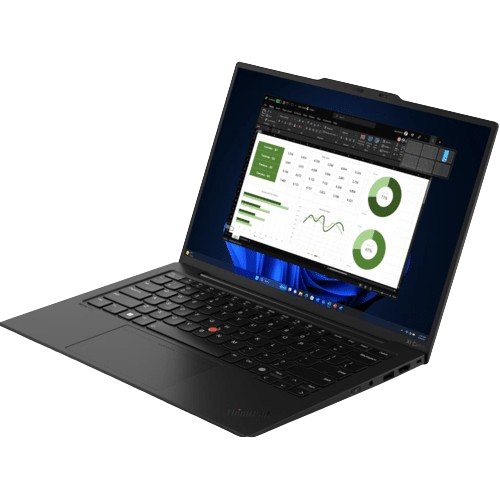
Lenovo ThinkPad X1 Carbon Gen 12
This ThinkPad from Lenovo sports a variety of Intel Core Ultra chips, up to 64GB of memory, up to 2TB of storage, and an optional OLED display on top of an 8MP webcam, too. If you want a seriously luxurious, reliable laptop, this is worth a look.
Pros- 64GB of RAM
- ThinkPad design
- 8MP webcam

When you’re looking for a great laptop, it’s always worth checking out the top ThinkPads and the best HP laptops, like the ThinkPad X1 Carbon Gen 12 or the HP EliteBook 1040 G11. But which should you buy? Luckily, we’re here to help you make that decision.
Below, you’ll find the ultimate ThinkPad X1 Carbon Gen 12 vs EliteBook 1040 G11 comparison.
Price, availability, and specs
Two premium computers out now
Lenovo’s ThinkPad X1 Carbon Gen 12 is out now, and pricing begins at $2499. However, Lenovo rarely sells these at their retail price and often for much less. At the time of writing, the base model is priced at $1499. Though, the top-end models will still get expensive.
HP’s EliteBook 1040 G11 is also available now, and pricing begins at $2837, though HP often runs sales offering deep discounts. It’s worth keeping in mind that configuration availability may be limited, however.
-
Lenovo ThinkPad X1 Carbon Gen 12 HP EliteBook 1040 G11 CPU Up to Intel Core Ultra 7 165U Up to Intel Core Ultra 165H GPU Intel Arc (integrated) Intel integrated graphics or Arc integrated graphics Display type IPS, anti-glare, 400 nits or OLED, 400 nits 60Hz IPS LCD or 120Hz OLED, touch or non-touch, up to 800 nits Display (Size, Resolution) 14-inch 120Hz 2.8K or 14-inch 60Hz 1920×1200 14-inches, 1920×1200 or 2880×1800 RAM Up to 64GB LPDDR5x Up to 32GB LPDDR5x 7467MHz (soldered), dual-channel Storage Up to 2TB M.2 PCIe 4.0 NVMe SSD Up to 2TB M.2 PCIe SSD Battery 57Wh Up to 68Whr Ports Two Thunderbolt 4, two USB-A 3.2, HDMI 2.1, 3.5mm audio 2x Thunderbolt 4, 1x USB Type-C, 1x USB Type-A, 1x 3.5mm audio jack, 1x HDMI 2.1 Operating System Windows 11 Up to Windows 11 Pro Dimensions 12.31 x 8.45 x 0.59 inches (312.8mm x 214.75mm x 14.96mm) 12.36 x 8.66 x 0.41-0.59 inches (313.9mm x 219.9mm x 10.5-14.9 mm) Weight From 2.42 pounds (1.09kg) From 2.57 pounds (1.18kg) Speakers Dual speakers, Dolby Atmos Quad speakers
2:48

Lenovo ThinkPad X1 Carbon (Gen 12) review: More power and improved features in a smaller body
Lenovo continues to find ways to improve on a what is already the best business laptop on the market.
Design and display
OLED display support on both
Big picture, these laptops have similar designs, but there are differences. Most importantly, the ThinkPad is more angular and features harder edges for a slightly industrial look, while the EliteBook is on the softer side. That said, both computers look and feel quite premium.
In terms of dimensions, the EliteBook is slightly larger than the ThinkPad and it’s also slightly heavier. However, not by a wide margin, and you won’t have any trouble with portability on either of these computers, even if neither is the smallest nor lightest out there.
With the display, you’re getting OLED and IPS options on both. The OLED panels feature 120Hz refresh rates and 2.8K resolutions, while the IPS panels are limited to 1920×1200 resolutions at 60Hz refresh rates. However, OLED EliteBook models currently have limited availability.
For webcams, the ThinkPad has an impressive 8MP camera, and the EliteBook has a 5MP sensor. Neither will have any trouble with Zoom meetings and video calls, but the ThinkPad will perform better thanks to its higher-res webcam. Both are quite competent, though.
In general, thanks to a slightly slimmer, lighter construction alongside a better webcam, the ThinkPad pulls ahead when it comes to design and display, but the competition here is close.
Winner: ThinkPad X1 Carbon Gen 12
Hardware and performance
Different Core Ultra chips

Source: HP
There are some key hardware differences between these machines to keep in mind.
For one, the ThinkPad has up to 64GB of memory when the EliteBook caps out at 32GB. Outside of that, though, the big difference comes down to the chips powering these computers. Twice the amount of RAM is no small difference, but only relatively few folks out there can really take advantage of 64GB of memory. They both feature Core Ultra CPUs, but not the same ones.
With the EliteBook, you get up to a 165H, and the ThinkPad supports up to a 155H. The 165H is clocked slightly faster than the 155H, and it also supports vPro. If you don’t know what that is, though, you probably don’t need it. Performance will be quite similar, but the 155H will be edged out by the 165H, making the EliteBook the technically more capable machine.
However, since the differences between the 155H and 165H aren’t significant, while if you do need more than 32GB of RAM you will feel that pain on the EliteBook, the ThinkPad overall takes the spot when it comes to hardware in our eyes, if not by a wide margin.
Winner: ThinkPad X1 Carbon Gen 12
Battery life
Similar performance out of both

Source: Lenovo
So far, we’ve reviewed the ThinkPad but not the EliteBook, and here’s what you need to know.
With the ThinkPad, we were able to manage up to 11 hours on a single charge, depending on usage and power profile. Considering the EliteBook has a similar suite of chips as well as a slightly larger battery, we’d expect similar battery life out of the EliteBook, even slightly better performance. That said, both look like they won’t have problems getting through a workday without needing to charge.
Until we test out the EliteBook for ourselves, we’d call this pretty evenly matched.
Winner: Tie
Overall winner: ThinkPad X1 Carbon Gen 12
A very close call
Overall, thanks to a lighter, slimmer construction, ThinkPad’s classic design and trademark reliability, support for up to 64GB of RAM, and an impressive 8MP webcam, the ThinkPad X1 Carbon Gen 12 is our winner, but that doesn’t mean you shouldn’t consider an EliteBook.

Lenovo ThinkPad X1 Carbon Gen 12
Winner
This ThinkPad from Lenovo sports a variety of Intel Core Ultra chips, up to 64GB of memory, up to 2TB of storage, and an optional OLED display on top of an 8MP webcam, too. If you want a seriously luxurious, reliable laptop, this is worth a look.
For one, if you want the most powerful Core Ultra chip possible, the EliteBook is definitely worth considering. Plus, if you’re looking for the largest battery, that’s also going to mean picking the EliteBook. Plus, you might be able to find an EliteBook for cheaper than a comparable ThinkPad.

HP EliteBook 1040 G11
Runner-up
$1649 $2837 Save $1188
This laptop sports Intel Core Ultra chips up to a 165H, up to 32GB of RAM, up to 2TB of storage, and a 120Hz OLED display option, too. If you’re looking for a premium, business-oriented computer, this is an excellent machine worth consideration.
#EliteBook #G11 #Lenovo #ThinkPad #Carbon #Gen #buy
source: https://www.xda-developers.com/hp-elitebook-1040-g11-vs-lenovo-thinkpad-x1-carbon-gen-12/


