

The thermal paste that comes pre-applied on your GPU out of the factory doesn’t last forever. Just like how you apply fresh thermal paste on your CPU every couple of years or so, you need to reapply the thermal paste on your GPU as well if you wish to maintain peak thermal performance. However, most people don’t really do this, and that’s mainly because disassembling a graphics card isn’t as straightforward as unmounting a CPU cooler. More importantly, there’s always the risk of potentially damaging your expensive GPU.
I had the same concerns when I first decided to change the thermal paste on my old Nvidia GTX 1060, but I just couldn’t bear the overheating and thermal throttling issues I encountered while gaming. Ever since, I have always made sure to replace the dried-up paste as soon as I noticed signs of overheating. Yes, the obvious benefit is that it lowers GPU temperatures, but once you actually go through the process, you’ll find it to be a learning experience like I did.
Related
How to apply thermal paste to a GPU
Discover the essential steps to properly apply thermal paste to your GPU for optimal performance and temperature control
3
Disassembling a GPU isn’t all that intimidating
You won’t damage it as long as you’re careful and patient
With how expensive modern graphics cards are these days, most people wouldn’t want to risk accidentally breaking something during a disassembly or voiding the warranty in the process. However, once I followed some tutorials on YouTube and started doing it myself patiently, I quickly realized that it’s not as intimidating as it seems. You don’t have to be an expert technician to carefully remove all the screws and separate the heatsink to apply fresh thermal paste.
However, it’s important to note that some graphics cards are more difficult to disassemble than others. For instance, Nvidia’s Founders Edition GPUs can be quite challenging to disassemble due to their custom cooling design. Liquid-cooled GPUs can also be just as, if not more, tricky to take apart because of the tubing involved. So far, I’ve found it very easy to disassemble standard air-cooled graphics cards, like the Asus ROG Strix GTX 1060 and RTX 3090. Regardless of how simple or complicated the process is, I only recommend repasting your GPU after the warranty has expired.
2
The quality of the thermal paste matters
Don’t hesitate to pay a premium for high-end thermal paste
When I first decided to repaste my GPU, I didn’t put much thought into the thermal paste I used. I just bought the Arctic MX-4 from Amazon and called it a day. Although it did a pretty good job at improving my GPU thermals, I quickly learned from various Reddit threads that thermal pastes with higher thermal conductivity perform better. The Arctic MX-4, for example, has a thermal conductivity of 8.5 W/mK, which is good, but I could have opted for something better, like the Thermal Grizzly Kryonaut, which boasts a thermal conductivity of 12.5 W/mK.
The higher thermal conductivity of the Kryonaut could’ve further improved my GPU temperatures by a couple of degrees, which may not seem like a lot, but when you’re spending all that time and effort repasting your GPU, why not choose the best option? It’s also worth noting that some modern high-end graphics cards, like the RTX 5090 Founders Edition and the Asus ROG Matrix RTX 4090, use liquid metal as the thermal compound; replacing it with a standard thermal paste will only make your GPU temperatures worse.
1
Thermal pads might need attention too
You’d benefit from replacing dried or worn-out thermal pads
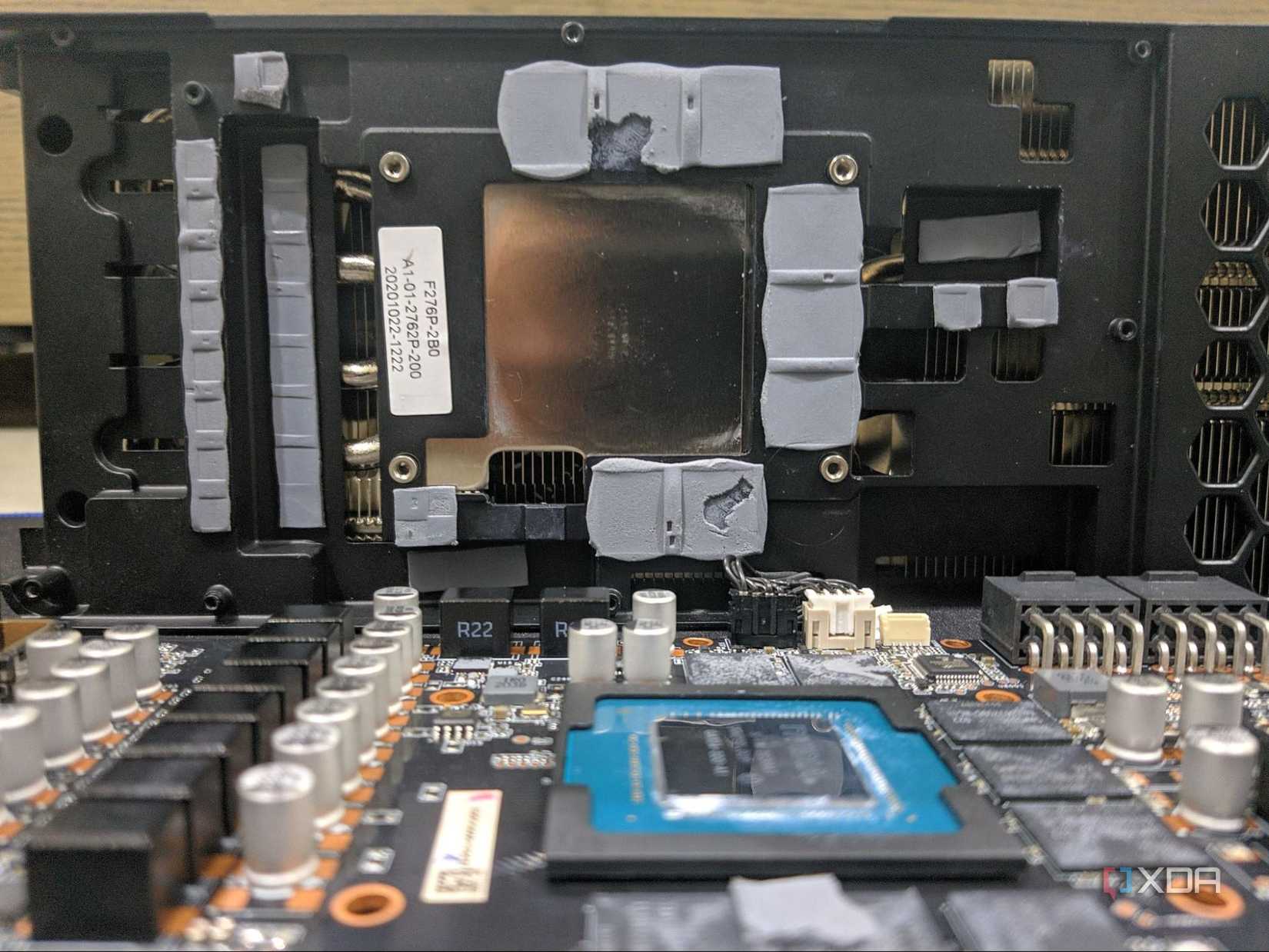
The thermal pads on your graphics card facilitate heat transfer from components like VRMs and memory chips. Just like the thermal paste, they can slowly degrade over time. When I disassembled my old RTX 3090 for the first time, I noticed that the pads were dry and worn out, but I didn’t bother replacing them along with the thermal paste. But soon enough, I noticed that the memory junction (VRAM) temperatures were still pretty high while monitoring using MSI Afterburner, often exceeding 95C. So, I had to disassemble it a second time and replace the pads with higher-quality ones from Thermal Grizzly.
Replacing the thermal pads is definitely a more involved process, requiring you to be precise with the pad thickness and placement. However, the temperature improvement and longevity gains are definitely worth the extra effort. You don’t have to do it every time you repaste your GPU. Thermal pads are far more durable and often only need replacing if you notice significant drying, warping, and accidental tearing during disassembly.
Repasting your GPU is worth all the effort
Repasting your GPU can seem intimidating at first, but the performance improvements, reduced temperatures, and quieter operation make all the effort worthwhile. Fresh thermal paste (and pads) not only lowers your GPU temperatures immediately but also prolongs its lifespan by preventing premature wear of internal components. Now that I have repasted GPUs several times over the past decade without damaging them, I feel confident in recommending the procedure to anyone who’s facing overheating issues. However, I still suggest you wait until your graphics card’s warranty expires.

Related
Consider these 5 alternatives before repasting your aging GPU for better temps
Your GPU’s thermal paste might not be what’s wrong
#realized #repasting #GPU #time
source: https://www.xda-developers.com/things-i-realized-after-repasting-gpu/


