

Customizing Windows is something we all get the urge to do at some point. It’s completely understandable, since the way Windows 11 does things can get long in the tooth after a while. Thankfully, there’s no shortage of apps that can customize all aspects of the Windows experience, and two prominent picks are Windhawk and Rainmeter.
These two apps share some common goals and approaches, but at the end of the day, they’re very different in a number of ways. So, when it comes time to choose between them, which way should you go? Let’s take a closer look.
What are Windhawk and Rainmeter?
At their core, Windhawk and Rainmeter have one fundamental similarity that’s paramount to both of them: they’re mostly driven by the community. Neither Windhawk nor Rainmeter offer much customization by themselves; instead, they’re platforms for community creations (called Mods in Windhawk and Skins in Rainmeter). It’s the community that determines how powerful these two apps are, because they’re the ones who create all the actual modifications you can apply to your system.
The big benefits of an approach like this are that the communities for these apps will likely never die out, so you’ll always find new and updated modifications for your system. Plus, since development efforts aren’t focused on a single team, new things can pop up all the time and not be limited by the vision of a specific person or group. These mods can do all sorts of things, from modifying the Start menu and taskbar to creating completely new UI elements.

Related
Windhawk is one of the coolest Windows customization tools I’ve ever seen
Lightweight and powerful customization
All the mods for Windhawk are open-source, so you can easily verify and modify the code if you want to. This is the first big distinction from Rainmeter, where developers can kind of choose how to share their skins, which aren’t always as transparent (though most of the time you can edit the configuration files anyway).
Ease of use
Windhawk wins here
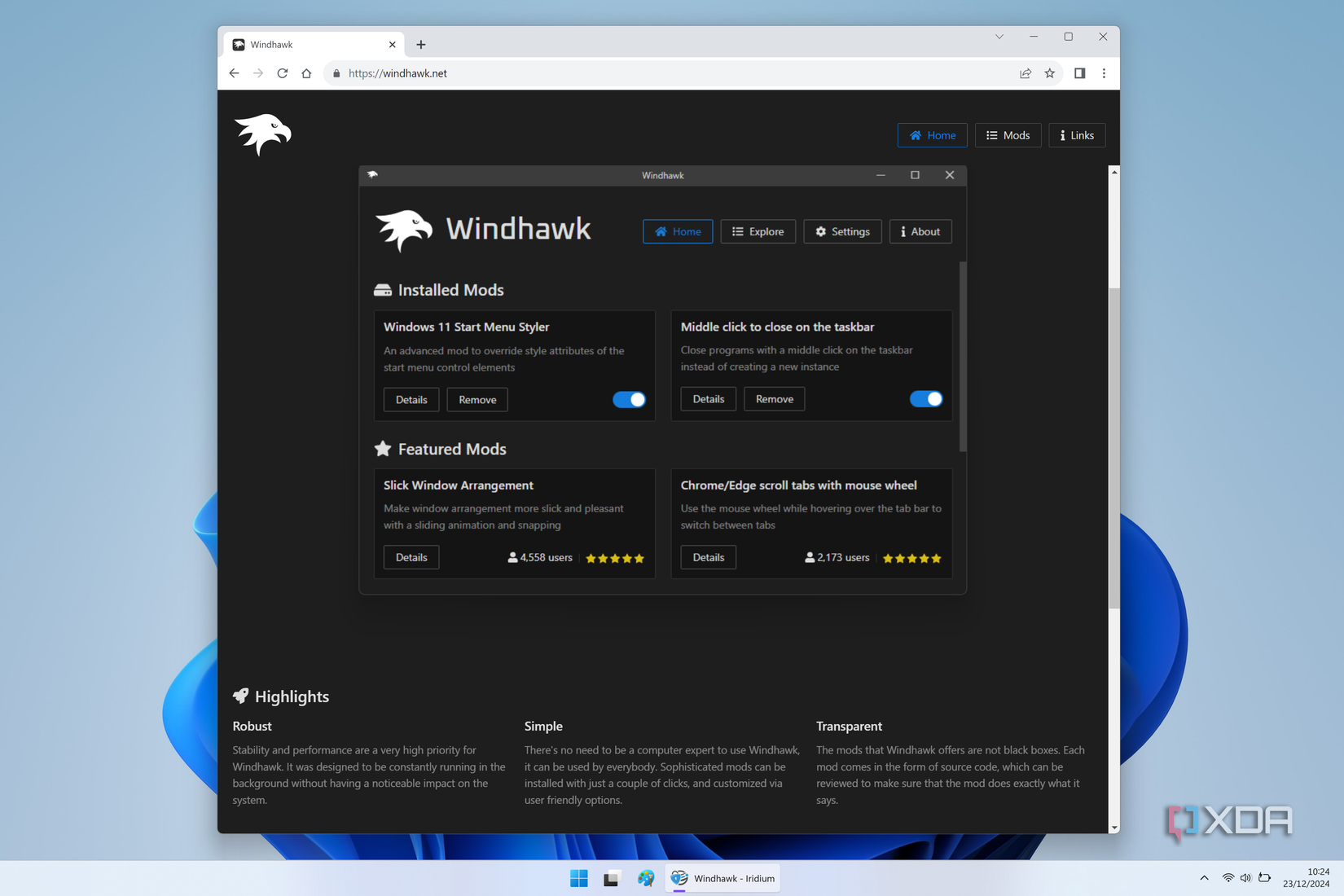
If you’re someone just getting started with customizing Windows, it’s probably important to have a tool that you feel is accessible and easy enough to use, and in that regard, Windhawk is probably the better choice. Windhawk is a more centralized platform, and every mod is available on the central database directly within the app itself, which makes it very easy to get started with installing mods. You can simply choose a mod from the list, preview it, install it, or customize it using the options provided. You can also enable or disable installed mods at will, and Windhawk even offers the option to easily update your mods.
This centralized approach makes it very easy to install and update mods, and because the database is managed by the platform, there are also things like user ratings for mods, so you can see at a glance if something may be worth giving a shot.

Related
4 reasons Windhawk is the ultimate tool for tweaking your Windows desktop
Windhawk is one of the greats, even if it’s recent
Windhawk’s customization is also a bit easier to understand. All of a mod’s options are generally shown clearly in the configuration page, and they can vary significantly from one mod to another. Rainmeter’s interface isn’t really designed to let you modify your customizations. You can enable or disable specific skins and customize general options, but any specific customization each skin offers needs to be changed within the skin itself, and it may not always be clear what you can do with it. Customization is a much more involved process with Rainmeter, and it can be make it intimidating for beginners.
Customization options
Rainmeter is basically limitless
The more convoluted approach to Rainmeter skins may be justified, though, because Rainmeter offers some incredible capabilities that go well beyond what Windhawk can do. Windhawk mods feel like a more literal interpretation of the word “mod”. They mostly focus on existing elements of Windows and modify them in various ways. You can customize the Start menu, taskbar, notification center, the behavior of some windows, or even change what certain actions do.
Rainmeter, on the other hand, is all about adding just about anything you want to your PC and modifying it in the craziest ways possible. It’s hard to define what Rainmeter skins can even do, because there’s so much I haven’t even tried for myself. A very common type of skin are the ones that add visual elements to your desktop. These can be a clock, calendar, audio visualizer, and even wallpaper with themed icons that all create a beautiful consistnet experience. Just adding a clock to the center of your screen can completely change the vibe of your desktop, and it’s very cool.
Many mods also add widgets to your desktop. Rainmeter actually includes one of these, with info such as free disk space on your drives or network usage. But there’s a never-ending number of options there. Some mods have ported the macOS widgets to Windows, so you can have things like a clock and calendar with that Apple design style right on your Windows desktop.
And then some mods are absolute game-changers, like Droptop Four. This is essentially an interpretation of the macOS menu bar, but because you can’t exactly replicate that functionality, it serves as a quick shortcut to almost anything you want. You can add apps and folders for quick access at any time. Plus, it even includes things like a volume control and other UI elements that are made from the ground up, not reusing Windows tools. It completely changes the feel of your PC.

Related
Rainmeter is the best way to make Windows look pretty, and here’s how to use it
Rainmeter is one of the oldest programs for customizing your desktop, but it’s still just as good these days as it was back then.
That’s just what I’ve had experience with, but I know there’s a lot more out there for those willing to look for it.
A unified platform or a free for all?

We’ve already touched on this, but the community is a crucial part of both of these tools, but they have radically different approaches. Windhawk offers a centralized platform for developers to submit their mods and make them available, which has benefits and downsides. The downside is that a developer may have to wait for approval before a mod is shown to users, which can create a delay, and it also means that at some point, mods could stop being accepted into the official mod catalog, which would render the community way less interesting.
But this unified approach not only makes it easier for users to install mods, but it provides a consistent experience for analyzing, modifying, and contributing mods to the community. You can install a mod and immediately see its source code in the appropriate page. If you want to change something about it, you can, and if you want to contribute those changes back to the community, you can easily fork a mod, because every mod is a GitHub entry that comes complete with its source code. And because of that, anyone can easily get the same spotlight on their mods.

Related
The decentralized approach of Rainmeter means that the community can truly keep the ecosystem alive no matter what’s happening with the core Rainmeter team. You can always find and share cusotm skins on online forums, Reddit, and so on, so the ecosystem can’t truly die out.
The downside of this, however, is that there’s no consistent experience for finding skins. Looking up Rainmeter skins on Google returns a series of unofficial websites hosting skins from multiple creators, but it’s hardly a transparent process. The Rainmeter forums also have threads for sharing and discussing skins and mods, but it’s not really the best as a simple source for skins to download. You have to dig through pages and read a lot to maybe find what you want.
Having such an open ecosystem makes it hard to find a community where you can reliably find the latest modifications being developed at any time.
Price
They’re both free
Finally, we can briefly touch on price, but there isn’t a lot to say here. Both Windhawk and Rainmeter are completely free. With Windhawk, because mods are made available through the official mod repository, all of them are also free to download, with developers having the option to ask users for donations to help maintain those mods.
Due to everyone distributing Rainmeter skins independently, there is room for some skins to be paid to some extent. The aforementioned Droptop Four is an example that, while free, has some options locked behind a paywall, and there may be other skins with a similar approach. That being said, though, the vast majority of Rainmeter skins are free.

Related
4 reasons Rainmeter is the best way to customize your Windows PC
Windows customization doesn’t get much better than this
Windhawk is the best place to get started
Overall, I would say Windhawk is the best choice if you’re someone who wants to customize your Windows experience without too many frills. It offers an easy-to-use interface with enough depth for developers to dive deeper and modify existing mods to make their own, and the centralized community makes it easier to find all the best mods.
Rainmeter is a much more in-depth customization tool, however. It can radically change the vibe of your PC by adding completely new elements to your desktop, and it’s seriously impressive. But it’s a lot harder to get started and used to all the things you can customize with it.
#Windhawk #Rainmeter #Choosing #customize #Windows
source: https://www.xda-developers.com/windhawk-vs-rainmeter/


